Now in early access

AI delivery that engineers actually trust

buildair cloud wraps your AI coding agent in real enterprise workflows — git branching, pull requests, structured releases, and full audit trails. Not vibe coding. Engineered software.

app.buildair.cloud / increments
buildair cloud — Increments view

Integrates with your stack

The elephant in the room

"Vibe coding is just glorified
copy-paste" — and they're right. Mostly.

Senior engineers are skeptical of AI-generated code for a reason. It bypasses every process their team has spent years building. buildair cloud changes that.

🚫
The problem

Why vibe coding gets dismissed

  • AI pushes directly to main — no branching, no isolation
  • No pull request, no code review, no second pair of eyes
  • No release versioning — you don't know what shipped when
  • No audit trail — compliance and security teams hate this
  • Context is a chat window — lost after every session
  • No structure around requirements — "make it better" is not a spec
  • Works great for prototypes, breaks in production environments
  • Can't integrate into existing CI/CD pipelines
The buildair way

Enterprise workflows, AI speed

  • Every increment gets its own branch — dev-<id> — automatically
  • Agent creates a pull request when the build completes
  • Semantic versioning with draft → implemented → released lifecycle
  • Full audit trail: who triggered what, when, on which branch
  • Persistent component knowledge base — context never lost
  • Structured increments with feature specs before any code runs
  • Built for production: works with your existing GitHub repos
  • Live build log streamed to the UI — full transparency
For Product Managers

From sticky note to sprint — without a developer in the room

Write how you think. Bullet points, rough ideas, a half-finished sentence — buildair cloud turns it into structured, development-ready specs automatically.

✏️

Just write keywords

No template, no ceremony. Write "user can filter orders by date range" and the AI assistant expands it into a full increment with acceptance criteria, technical context, and edge cases.

📤

Export to Jira-ready format

Every increment is structured to map directly onto a Jira ticket. Export individually or as a batch — title, description, acceptance criteria all filled in. Ready to paste or integrate.

🍒

Cherry-pick into releases

Done increments don't auto-ship. You decide which features go into v1.2 and which wait for v1.3. Select, confirm — your release, your call.

🤝

Share with the team before building

Developers review the structured spec before a single line of code is written. Less "that's not what I meant", more shipping the right thing first.
Raw idea
"users should be able to filter their order list — maybe by date, status, maybe search by product name too"
AI assistant transforms
Ready for development
🎯 Order list filtering
Dev increment~2h estimated
Acceptance criteria
  • Filter by date range (from / to)
  • Filter by order status (pending, shipped, delivered)
  • Full-text search on product name
  • Filters persist on page reload
Technical notes

Filters applied client-side. State in URL params for shareability.

Export to Jira Start build →
For Developers

Your workflow. Your tools. Just faster.

buildair cloud doesn't replace how you work — it accelerates it. PRs land in your inbox like any other contribution. You review, you merge, you ship.

🔀

Every build is a proper PR

Isolated branch, automated checks, PR opened. Review it in GitHub, request changes, merge when happy. The process your team already trusts.

📋

Specs before code

The AI works from your component knowledge base — your architecture, your patterns. No random choices, no mystery code style.

🔍

Full transparency, always

Live build log, versioned agent, PR diff, full audit trail. You know exactly what ran, when, and why. No black box.

Pull request opened by buildair agent
feat: Order list filtering (date, status, search)
dev-47 → main 3 files · +182 −4
CI / build passed
Unit tests (47 passed)
Type check
Awaiting your review
View diff on GitHub Merge pull request
The Full-Stack Builder

One person. Full product. Ship daily.

The best engineers today are full-stack builders — backend, frontend, infra, product, design thinking, all in one. Vibe coding tools are built for demos. buildair cloud is built for you.

Stop babysitting AI outputs. Define your component architecture once, let the agent execute on a real branch, review the PR, ship the release. Repeat every week. That's the full-stack builder loop.

🧠

You define the product

Write specs in your knowledge base. The AI understands your architecture, not just a chat prompt.

AI does the heavy lifting

The agent builds the feature on an isolated branch and opens a PR. You stay in flow.

🚀

You own the release

Cherry-pick features into versioned releases. Ship when you're ready. Every version traceable.

How it works

From idea to pull request in minutes

Define, build, review, release. The same workflow your team already knows — now automated.

1

Define your increment

Write a structured feature spec inside your component knowledge base. The AI understands context, constraints, and your architecture — not just the current chat.

2

Agent builds on a branch

buildair cloud launches your GitHub Copilot agent on a dedicated branch dev-<id>. You watch the live build log. When done, a PR is created automatically.

3

Review, release, repeat

Review the PR like any other. Mark the increment as implemented, bundle it into a versioned release, and ship. Every step logged, every release traceable.

Features

Everything a real engineering team needs

🌿

Auto-branching

Every dev increment creates its own branch. Keeps main clean, parallel work safe, and history meaningful.

🔀

Automatic pull requests

When the agent finishes building, a pull request is opened with proper title, description, and linked increment.

📦

Release management

Group increments into versioned releases (major/minor/patch). Draft, publish, and track what shipped in each version.

📋

Component knowledge base

Document your architecture once. The AI reads it every build — consistent decisions, no context drift between sessions.

📡

Live build log

Watch the agent work in real time. Every line of SDK output streamed to the UI. No guessing what happened.

🔒

Audit trail

Every increment tracks who triggered it, which branch it used, when it was implemented, and which release it shipped in.

🤖

Assistants

Attach AI assistants to components for tasks like writing release notes, generating test plans, or reviewing feature specs.

🧩

Multi-product workspace

Manage multiple products, each with their own components, documents, increments, and release history.

⚙️

Self-hosted agent

The builder agent runs on your infrastructure. Your code never leaves your GitHub. You control every deployment.

Product

Built for how engineers already work

No new process to learn. buildair cloud fits into the workflows your team already has.

Release management

Every release, fully versioned and traceable

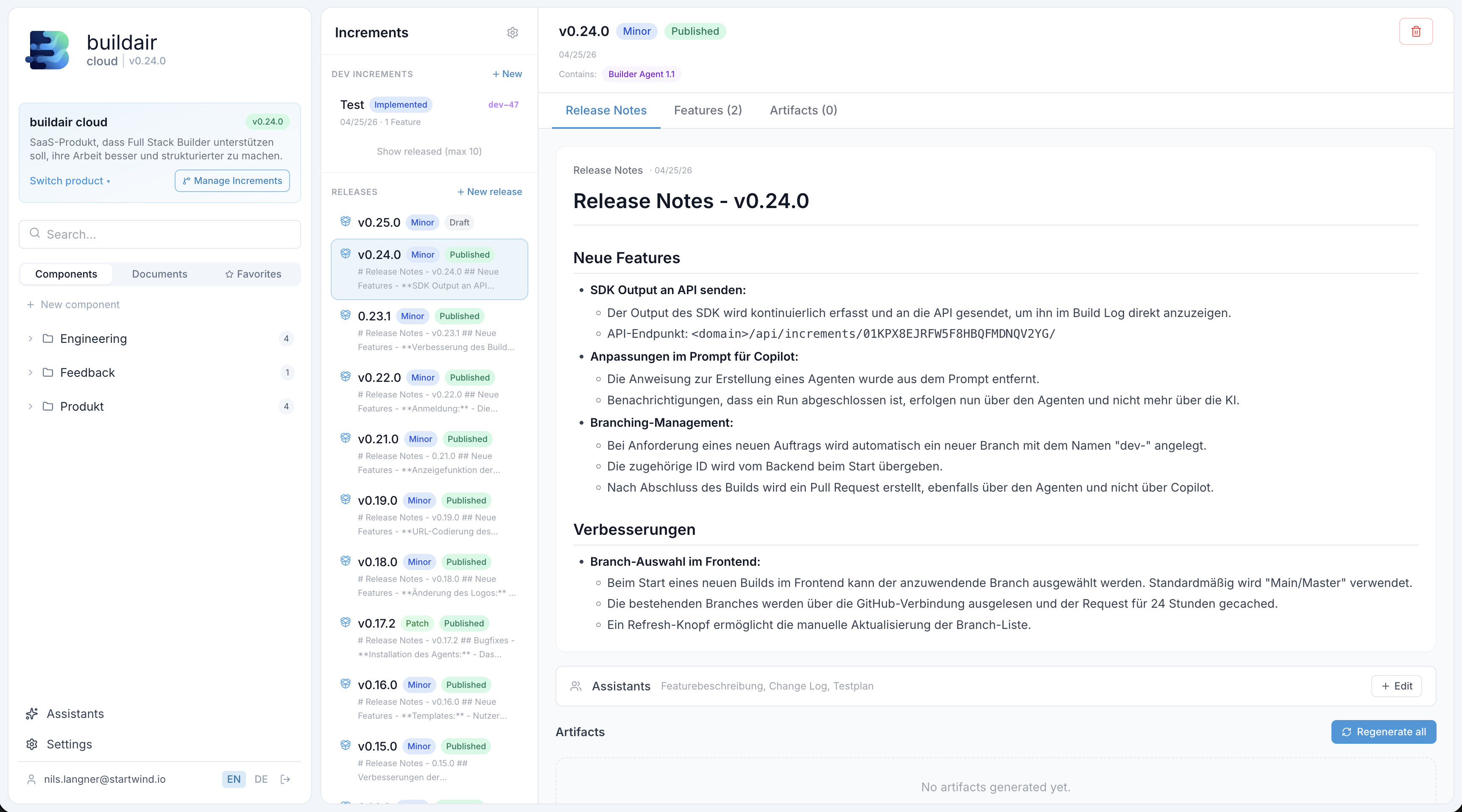
Dev increments move from draft → implemented → released. Bundle multiple features into a single versioned release with auto-generated release notes.

  • Semantic versioning built in (major / minor / patch)
  • See which agent version was used for each build
  • Release notes auto-generated from increment descriptions
  • Clear status lifecycle — no ambiguity about what shipped
Increments and release management view

Knowledge base

Context that persists across every build

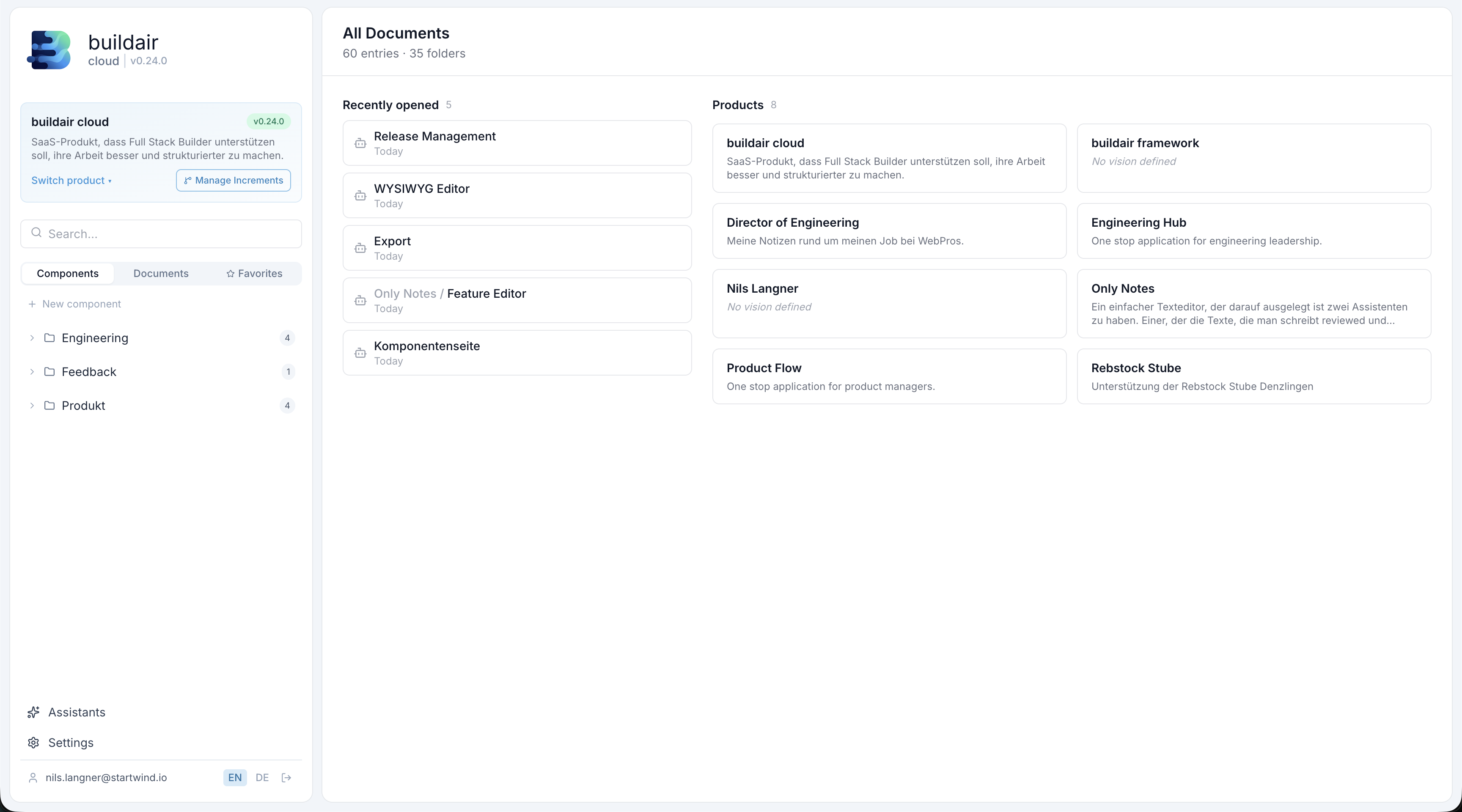
Structure your product knowledge in folders and components. The AI reads this context before every build — your architecture decisions are never forgotten.

  • Hierarchical component and folder structure
  • AI assistants attached to any component
  • Multiple products in one workspace
  • 60+ documents, 35+ folders in a real-world project
Documents and knowledge base view

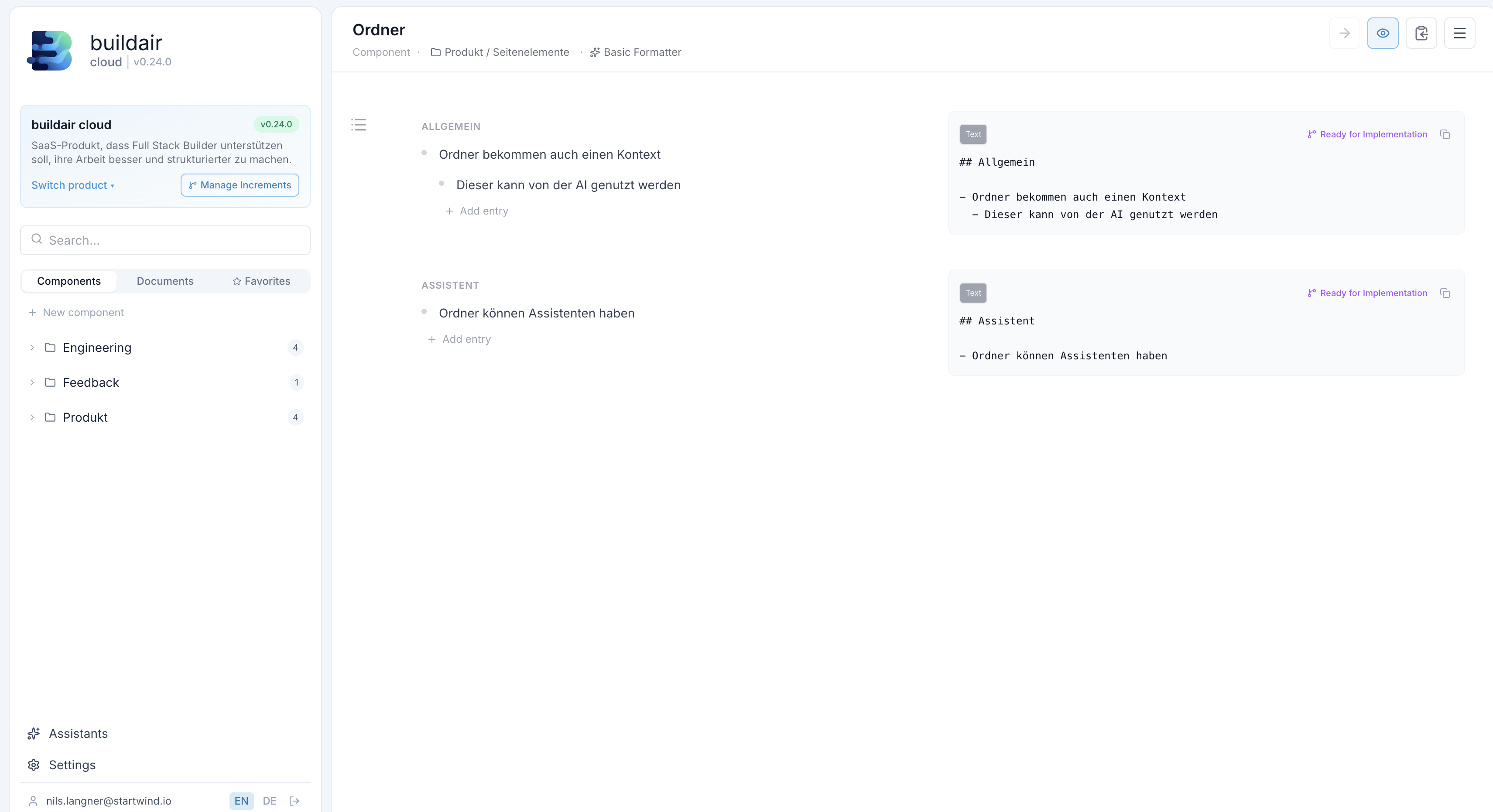
Component editor

Structured specs the AI can actually use

Define component behaviour in a structured, section-based editor. Each section becomes part of the AI's build context — precise input, precise output.

  • Sections with labels (General, Assistant, etc.)
  • "Ready for Implementation" preview on every section
  • AI-rendered output shown inline next to your notes
  • Breadcrumb navigation for deep component hierarchies
Component editor view
Live build log

Watch the agent work in real time

Every line of output from the GitHub Copilot SDK is streamed to the UI. You always know what the agent is doing — and you can close the tab and come back later.

What you see in the log

🚀

Agent startup sequence

The agent announces which version it is, connects to the API, and confirms which branch it's building on.

💭

Live thinking indicator

While the agent is working, the log shows an animated "thinking …" line so you always know it's active.

Completion + PR link

When the build finishes, the agent posts the result and the pull request URL directly into the log.

buildair agent · v1.0.0 · dev-47
────────────────────────────────────── buildair cloud · Builder Agent v1.0.0 ────────────────────────────────────── Connecting to API... OK Increment loaded: 01KPX8... Base branch: main Creating branch: dev-47 Branch created OK ────────────────────────────────────── ▶ Starting GitHub Copilot SDK... Reading component context done Loading feature spec done Preparing prompt done ◆ thinking ... ────────────────────────────────────── ✎ You can close this tab. The build continues in the background.
Pricing

Simple pricing, no surprises

Simple per-user pricing. The Platform plan gives you the full workflow — add the AI Builder when you're ready to automate.

Platform
€10 / user / month

Full product management platform — increments, releases, knowledge base, and component specs. Bring your own AI agent.

Get started
  • Unlimited products & increments
  • Release management
  • Component knowledge base
  • AI assistants on components
  • GitHub integration
  • Auto-branching & PR creation
Enterprise
On request

Self-hosted deployment, SSO, compliance, dedicated support and custom SLA.

Talk to us
  • Everything in Platform + AI Builder
  • Self-hosted / on-premise
  • SSO + audit logs
  • Custom SLA
  • Dedicated onboarding

Frequently asked questions

No. The builder agent runs on your own infrastructure and communicates directly with GitHub. Your source code never passes through buildair cloud's servers. We only store increment metadata, release information, and build logs.
The builder agent is powered by GitHub Copilot (via the Copilot SDK). It uses your existing GitHub Copilot subscription, which means it benefits from Copilot's latest models and your organisation's enterprise agreement.
Everything happens on an isolated branch. The agent opens a pull request, not a direct merge to main. Your team reviews the PR just like any other contribution — the AI is a fast first-pass developer, not a magic button that bypasses review.
Copilot Workspace and Cursor are excellent coding tools. buildair cloud sits above them — it's the delivery layer. We handle the product management side: what to build, in which order, on which branch, grouped into which release. The agent uses Copilot under the hood, but buildair provides the structure that makes the output production-ready.
Yes. Connect your existing GitHub repository and point the agent at it. The component knowledge base helps you document what already exists, and the agent will respect your architecture when building new features.
The agent is a single binary that runs as a systemd service on your server. Updates are delivered via a GitHub Actions workflow that builds the binary, deploys it over SSH, and records the new version. The UI shows which agent version is connected.

Ready to ship AI code your team will trust?

Join the early access programme — free to start, no credit card required.

Get early access Talk to us →